How Telegram API Integration Works in Real Time
In this blog, you will learn how Telegram API Integration works in real time and how different software systems connect with Telegram to share data automatically.
1. Introduction
Telegram API integration is not just about sending messages. It is a system where business tools, applications, and databases connect with Telegram using APIs to enable automated communication without manual work.
Instead of people handling tasks manually, systems exchange data automatically based on real-time events.
In simple words:
- Your business system sends data when something happens
- Telegram receives or responds with updates
- Everything runs through API-based automation in real time
This creates a smooth connection between your business tools and Telegram, allowing real-time messaging, notifications, and workflow automation without human involvement.
2. What Happens Behind Telegram API Integration
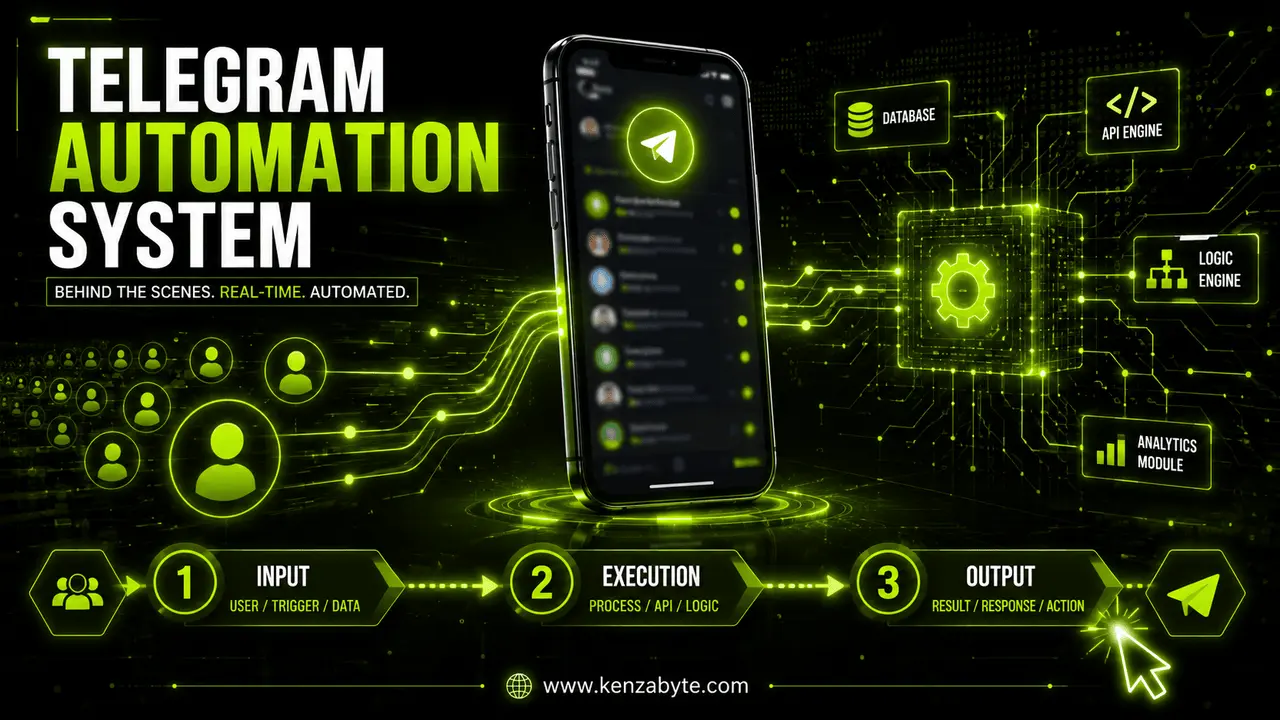
In real-time systems, Telegram API integration works as a communication bridge between business applications and Telegram. It enables different systems to interact using API requests, responses, and automation logic.
When an event occurs in your system, the integration layer sends that data to Telegram using API calls. Telegram then processes it and delivers messages instantly.
Main components of the system:
Business System (CRM, website, app, database)
This is where all data is generated, such as orders, user activity, payments, and system events.
Telegram API (messaging interface)
This acts as the communication layer that receives requests and sends messages, alerts, or updates.
Integration Layer (backend logic or server)
This controls what data is sent, when it is sent, and how it is formatted before reaching Telegram.
Together, these components create an event-driven automation system where data flows automatically in real time.
Simple flow:
- Event occurs in business system
- API detects the event
- Data is processed and sent to Telegram
- Telegram delivers message instantly
- System updates are synced in backend systems
This process runs continuously in the background.
3. How Data Moves in Real Time
One of the key strengths of Telegram API-based systems is event-driven data flow. Nothing runs randomly—everything happens only when a specific action is triggered.
Common events:
- Customer places an order
- User registers on a platform
- Payment is completed
Once triggered, the system immediately starts processing the event without manual input.
Real-time data flow process:
- Event is triggered in system
- Backend creates an API request
- Data is structured in JSON format
- Request is sent to Telegram API
- Telegram processes the request
- Message is delivered instantly to user or group
This ensures fast communication and keeps all systems perfectly synchronized.
4. Core Components Behind Telegram API System
Telegram automation is built using multiple layers that handle data flow and system communication.
API Requests
API requests are how systems communicate with Telegram. They are triggered when an event occurs and carry structured data.
They include:
- Message content
- Chat or user ID
- Event type (order, signup, payment)
- Message formatting rules
Webhooks (Event Triggers)
Webhooks are automated event listeners that detect changes in real time without manual checking.
Common triggers:
- New user registration
- Payment confirmation
- Order status update
- Lead submission
Once triggered, they immediately send data to the backend for processing.
Backend Server (Processing Layer)
The backend server is the control system of the integration. It handles all logic before sending anything to Telegram.
Responsibilities:
- Validating event data
- Applying business rules
- Structuring API requests
- Sending data to Telegram API
Database (Storage Layer)
The database stores all business data required for automation.
It includes:
- User profiles
- Orders and transactions
- Payment records
- System logs and activity data
This information helps the backend decide what action should be triggered.
5. How Automation Works in Telegram API Systems
Automation is the core of Telegram-based integration. It allows systems to react instantly when something happens in the business.
When an event is detected, the backend processes it and triggers an API call. Telegram then sends messages instantly while other systems update their records in parallel.
Automation flow example:
- User places an order
- Payment gateway confirms transaction
- Backend triggers API request
- Telegram sends confirmation message
- CRM updates customer record automatically
No manual action is needed at any step.
6. Why Businesses Use Telegram API Integration
Businesses use Telegram automation to improve speed, accuracy, and operational efficiency.
Key benefits:
- Real-time communication between systems
- Automated notifications and alerts
- Reduced manual workload
- Better workflow control
- Lower human error rate
It connects multiple platforms into one automated communication system. If you want a custom-built automation system for your business, you can explore our Telegram integration solutions designed for real-time automation and backend workflows designed for scalable systems.
7. Common Use Cases
Telegram API integration is widely used in modern automation systems such as:
- E-commerce order tracking
- CRM notifications
- Payment gateway alerts
- Lead management systems
- Customer support automation
- Internal reporting systems
All systems stay connected through API-driven communication.
8. Security in Telegram API Integration
Security is an important part of any Telegram API system.
These systems use:
- Secure API tokens for authentication
- Encrypted data transmission
- Access control rules
- Server-side validation
This ensures only authorized systems can access or send data.
FAQs
1. What is Telegram API integration?
It is a system that connects business applications with Telegram to automate messaging and data exchange.
2. Does Telegram API work in real time?
Yes, it uses webhooks and API triggers to deliver updates instantly.
3. Is coding required for Telegram API integration?
Yes, backend logic is required to connect systems with Telegram.
4. Can Telegram API integrate with CRM systems?
Yes, it can connect with CRM, e-commerce, and other business tools.
5. Is Telegram API integration secure?
Yes, it uses encrypted communication and authentication systems.
6. What triggers Telegram API messages?
Events like orders, payments, signups, and system updates.
7. Can small businesses use Telegram API integration?
Yes, it works for both small and large businesses.
Conclusion
Telegram API integration is a powerful event-driven automation system that connects business tools with Telegram using APIs. It removes manual work, improves communication speed, and enables real-time data synchronization across multiple platforms.
Understanding how this system works helps businesses build smarter automation, faster workflows, and scalable communication systems.

Arabella Montrose
I have over 8 years of experience in content writing, specializing in Telegram automation, user-friendly tools, and social media marketing services. I work closely with the Kenza Byte team to ensure every article I write is accurate, clear, and genuinely helpful for users and businesses focused on digital growth.