How to Create Telegram Bot: Easy Step-by-Step Guide
Learn how to create telegram bot from scratch with this simple guide. You’ll get step-by-step instructions to generate a bot token, configure commands, and test your bot safely and effectively.
Whether you want to automate messages, send notifications, or run commands, this guide covers everything needed to get started.
Why You Should Create a Telegram Bot
Telegram bots can be useful for anyone, not just tech experts. They allow you to:
- Handle routine tasks: Set up scheduled messages, reminders, or alerts effortlessly.
- Deliver instant updates: Keep your audience informed with timely notifications.
- Enable interactive features: Run polls, respond to commands, or manage chats smoothly.
- Save time: Bots handle routine tasks so you can focus on important work.
Even beginners can set up a fully functional bot in minutes by following the right steps.
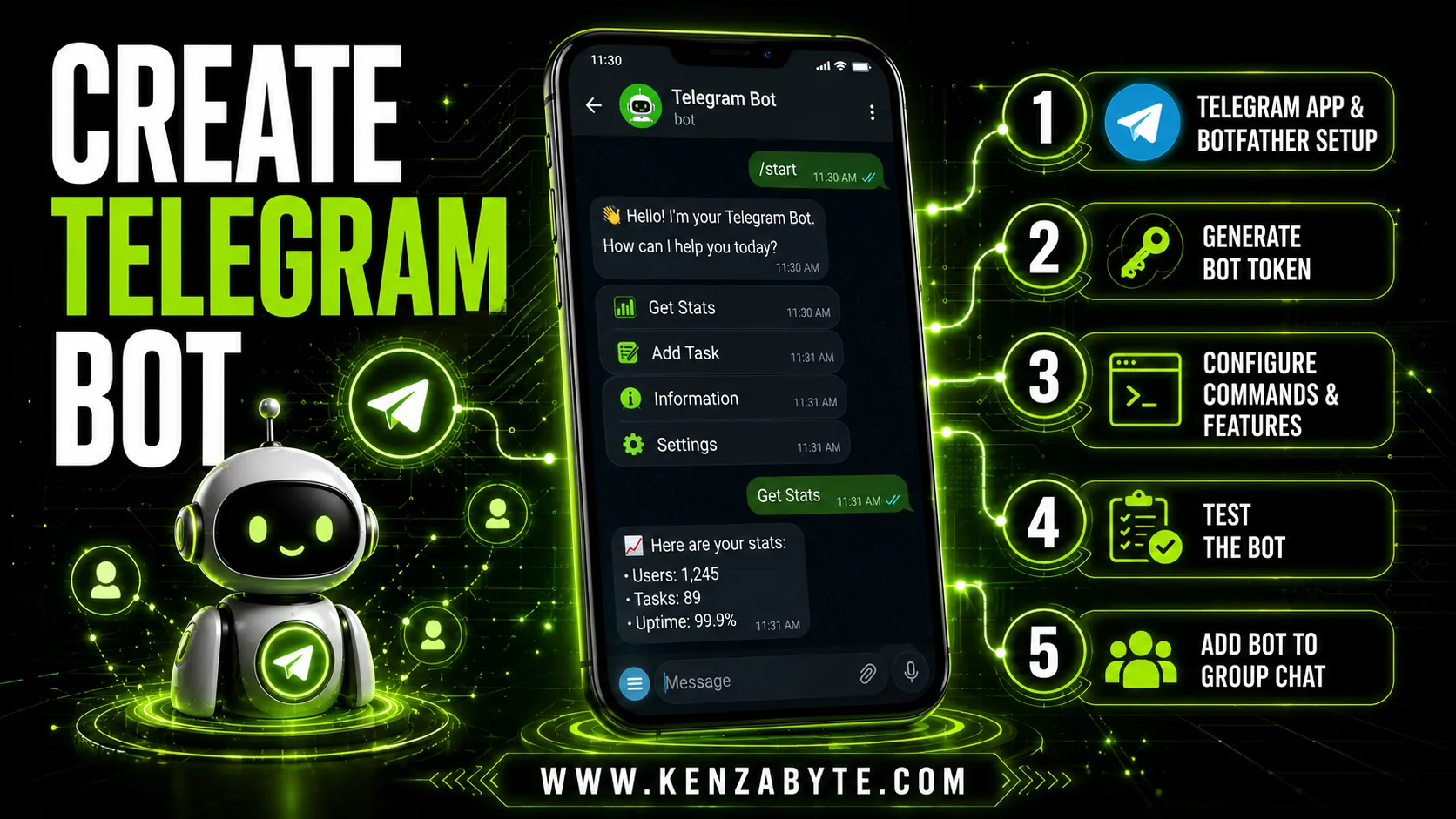
How to Create Telegram Bot using BotFather: 5 Steps
Follow these 5 simple steps to create your own Telegram bot from scratch. Each step guides you through setup, configuration, and testing to get your bot ready.
Need a little extra help? If you’re unsure how to get started, our Telegram bot development support can guide you through the setup safely and confidently.
Step 1: Set Up Telegram & Access BotFather
To start, you need the Telegram app:
- Install Telegram on your device (phone, tablet, or PC).
- Create an account or log in to your existing account.
- Search for BotFather in the Telegram search bar.
- Start a chat with BotFather (look for the verified badge ✅).
Why BotFather?
BotFather is the official Telegram tool for creating and managing bots. It acts as the central hub for your bot setup.
For a detailed, step-by-step walkthrough on using BotFather safely and effectively, check out our complete BotFather guide. This guide explains every feature, token, and more.
Step 2: Generate Your Telegram Bot Token
Next, create your bot and get its token:
- Send
/newbotto BotFather. - Give your bot a name that is clear and recognizable.
- Choose a username ending with “bot” (e.g., MyHelperBot).
- BotFather generates a unique bot token, like:
123456789:ABCdefGhIJKlmNoPQRstuVWXyz
Why the token matters:
- The token links your bot to Telegram servers.
- Keep it private; anyone with this token can control your bot.
- It is needed to configure commands, features, or integrations.
Step 3: Configure Bot Features
Once you have the token, you can set up your bot:
- Commands: Define how the bot responds, e.g.,
/startor/help. - Description: Add a brief explanation of the bot’s purpose.
- Profile picture: Make your bot visually identifiable.
- Integrations: Connect the bot to apps or tools using the token.
Tip: Start with simple commands before adding advanced features. This ensures smooth functionality.
Step 4: Test Your Bot
Testing is crucial for proper setup:
- Chat with your bot in private messages.
- Send commands to confirm it responds correctly.
- Test different scenarios to check error handling.
A well-tested bot ensures reliability and smooth performance.
Step 5: Add Your Bot to a Group Chat
(Optional) After testing, you can add the bot to a group:
- Open the desired group chat.
- Tap Add Members and search for your bot’s username.
- Assign admin permissions if needed for sending messages or moderating tasks.
- Test commands to confirm everything works.
FAQs Related to Creating Telegram Bots
1. Can I create a Telegram bot without coding?
Yes. Using BotFather and simple commands, anyone can set up a basic bot without programming skills. However, if you want a custom bot with advanced features or automated workflows, some programming knowledge will be required to make it fully functional and tailored to your needs.
2. How do I get a bot token?
BotFather generates a unique token for every new bot you create. This token is like a secret key that connects your bot to Telegram’s servers. Keep it secure because anyone with this token can control your bot.
3. Can I add bots to a group chat?
Yes. Once your bot is ready, you can add it to any group chat just like a normal member. Assign admin permissions if your bot needs to send messages, manage content, or run polls.
4. Is it safe to use Telegram bots?
Official Telegram bots and tokens are safe. Follow best practices: never share your token publicly and use trusted services for hosting or automation. This ensures your bot and users remain secure.
5. Can one account create multiple bots?
Yes. Telegram allows one account to create as many bots as you need. Each bot will have its own token, username, and configuration.
6. What features can a bot have?
Bots can handle notifications, respond to commands, run polls, send reminders, and integrate with external apps or services. For more advanced functionality, programming may be required to add custom logic or automation.
7. Do I need third-party apps for a basic bot?
No. BotFather is sufficient for creating a simple bot that responds to commands and handles basic interactions. Third-party apps are only needed for advanced automation or continuous hosting.
8. Can a Telegram bot run 24/7?
Yes. To keep a bot running continuously, it must be hosted on a server or connected to a particular platforms like windows or Linux servers. Basic bots without hosting will only work when you interact with them manually.
Conclusion
Creating a telegram bot is straightforward. By following these steps, you can:
- Generate a secure bot token.
- Configure commands and features.
- Test your bot for proper functionality.
- Optionally, add it to a group for shared use.
For more advanced setups, explore additional guides to expand your bot’s capabilities and functionality.

Arabella Montrose
I have over 8 years of experience in content writing, specializing in Telegram automation, user-friendly tools, and social media marketing services. I work closely with the Kenza Byte team to ensure every article I write is accurate, clear, and genuinely helpful for users and businesses focused on digital growth.